
ORADI 10 Sections104 Lessons11 Quizzes12 Weeks
Welcome To Your ORADI Journey
ORADI Orientation
Welcome to ORADI
Welcome to ORADI. You are beginning a journey that will help you use digital tools, AI and workplace skills to complete practical tasks with confidence.

ORADI stands for Office Ready Applied Digital Intelligence. The word applied describes how you will learn here. You will gain knowledge, practise skills, produce work, receive feedback and improve.
You do not need to know everything before you begin. Bring a willingness to learn and the determination to keep practising.
Watch the Video Below
Welcome to ORADI and Your 12-Week Journey
The video introduces ORADI, what you will learn and how to approach your journey.
What You Will Learn
By the end of this lesson, you should be able to:
- Explain what ORADI aims to help you do.
- Describe the main stages of your learning journey.
- Identify the eight areas you will study.
- Set a personal goal you can revisit as you progress.
- Explain what you must complete before Module 1 opens.
1. What Is ORADI?
ORADI is a 12-week online programme in practical digital, AI, office and workplace skills.
The programme aims to help you move from “I have heard of this tool” to “I can use this tool to complete a task and check the quality of my work.”
Think about a professional email. Knowing what an email is gives you a starting point. Writing an email with a clear subject, an appropriate greeting, a useful message and a professional closing shows that you can apply what you know.
You will meet this difference between knowing and doing throughout ORADI.
2. Your Learning Journey
Your journey follows a clear sequence:
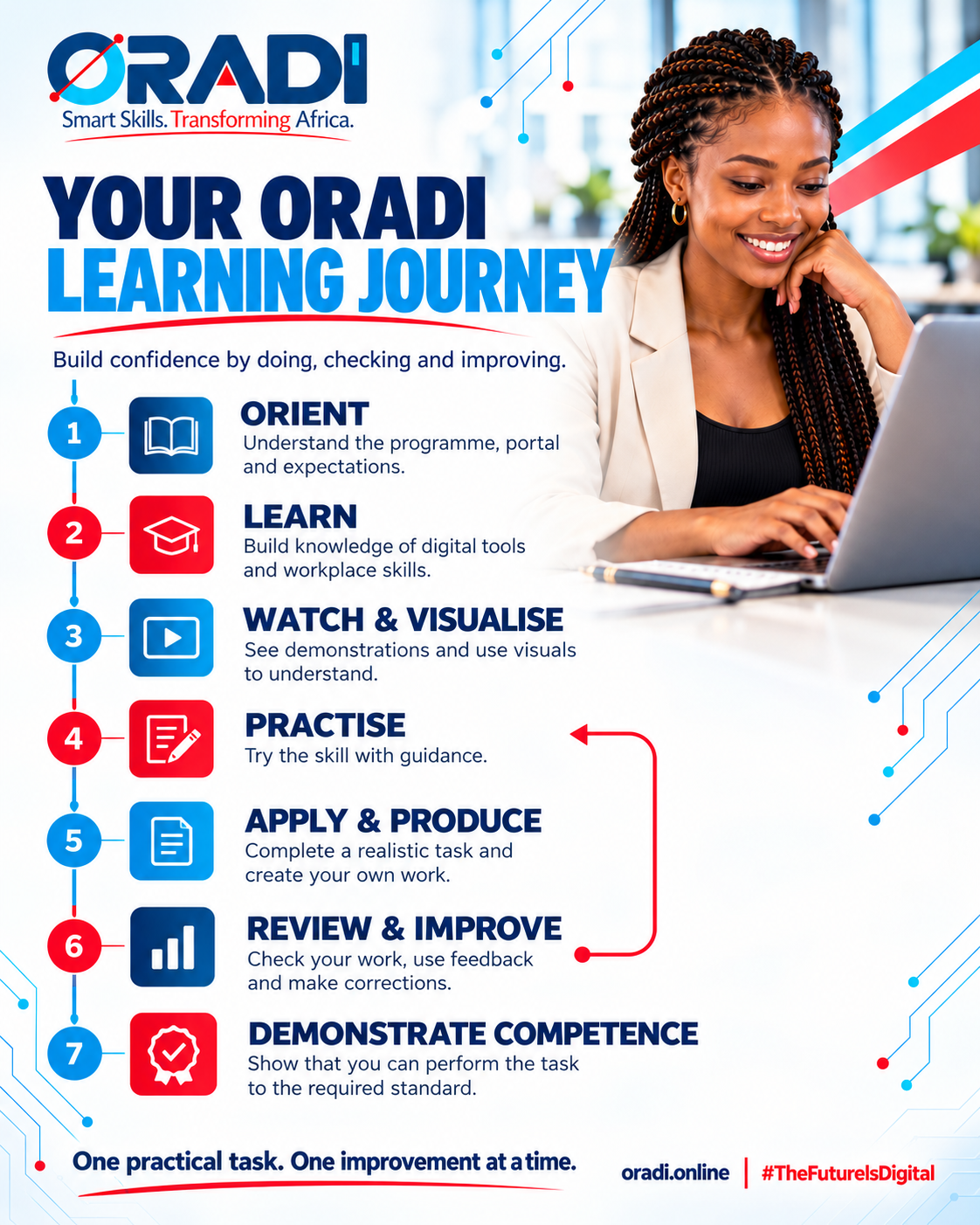
Orient → Learn → Watch → Visualise → Practise → Apply → Produce → Review → Improve → Demonstrate Competence
- Orient: Learn how the programme works and what is expected of you.
- Learn: Build your understanding of a topic or skill.
- Watch and visualise: See a demonstration and use visuals to make ideas clearer.
- Practise: Try the skill with guidance.
- Apply and produce: Use the skill to complete a realistic task or create a piece of work.
- Review and improve: Check your work, consider feedback and make corrections.
- Demonstrate competence: Show that you can use what you have learned.
Progress means completing the required learning activities and developing your ability. Opening a page alone does not show that you can perform a skill.
Study the Infographic Below
The infographic shows the journey from Orientation through learning, practical work, feedback, assessment and your next step. Follow the arrows and notice where practice and improvement fit in.
3. The Eight Areas You Will Study
ORADI contains eight modules and 96 lessons.
- Computer Fundamentals & Digital Literacy.
- Business Communication with Microsoft Word.
- Business Presentations with Microsoft PowerPoint.
- Office Administration & Professional Workplace Skills.
- Data Management & Analysis with Microsoft Excel.
- Digital Communication, Email & Google Workspace.
- AI for the Modern Workplace & Digital Productivity.
- Customer Service, Career Readiness & Entrepreneurship.
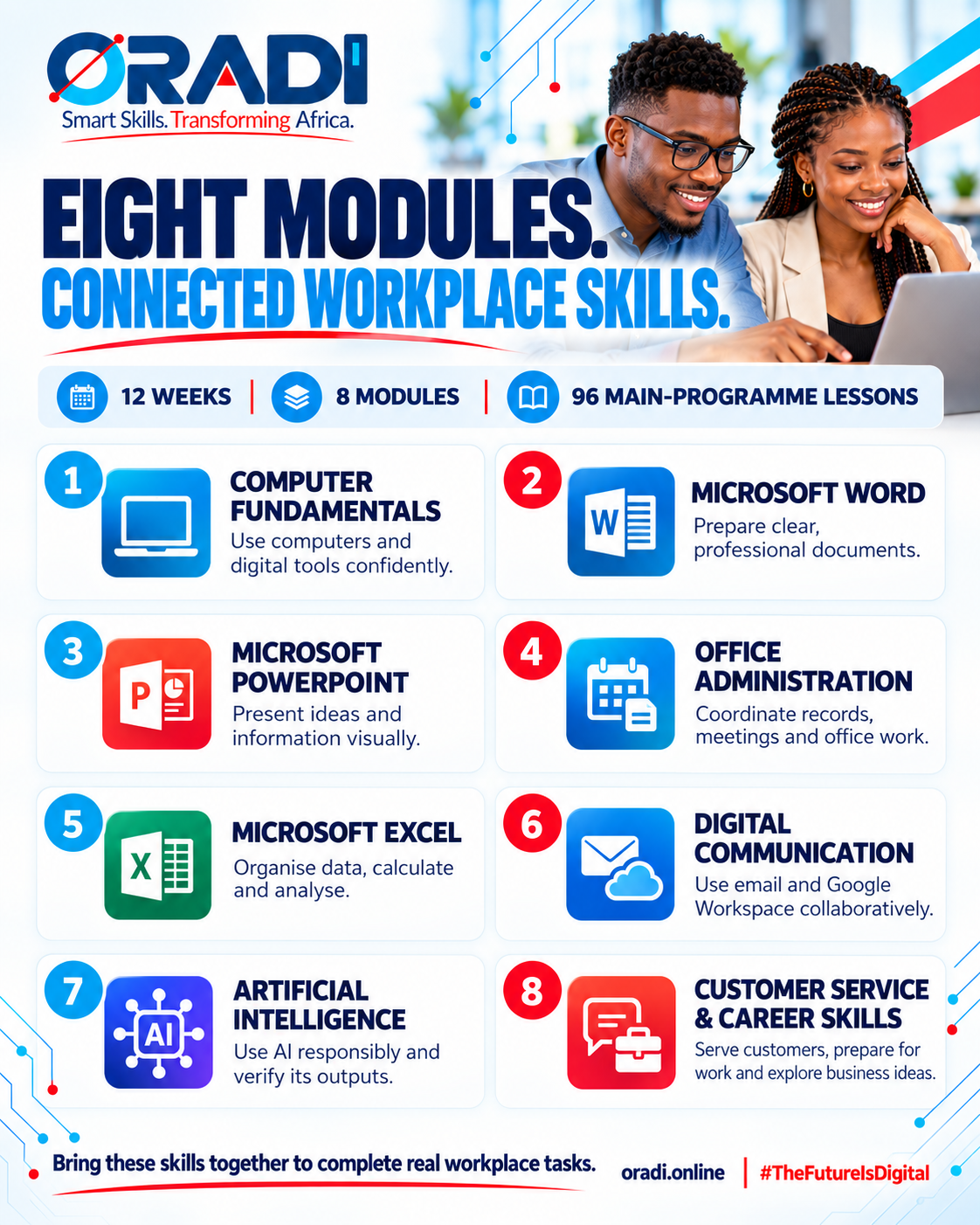
The modules build connected abilities. In a workplace, one task may require you to research information, organise figures, prepare a document, present a finding and communicate with others. ORADI will help you bring those skills together.
4. How You Begin
Before the main modules, you will complete eight Orientation lessons. They will introduce you to the Student Portal, learning activities, community and support, assessment rules, responsible AI use, programme responsibilities and your next steps.
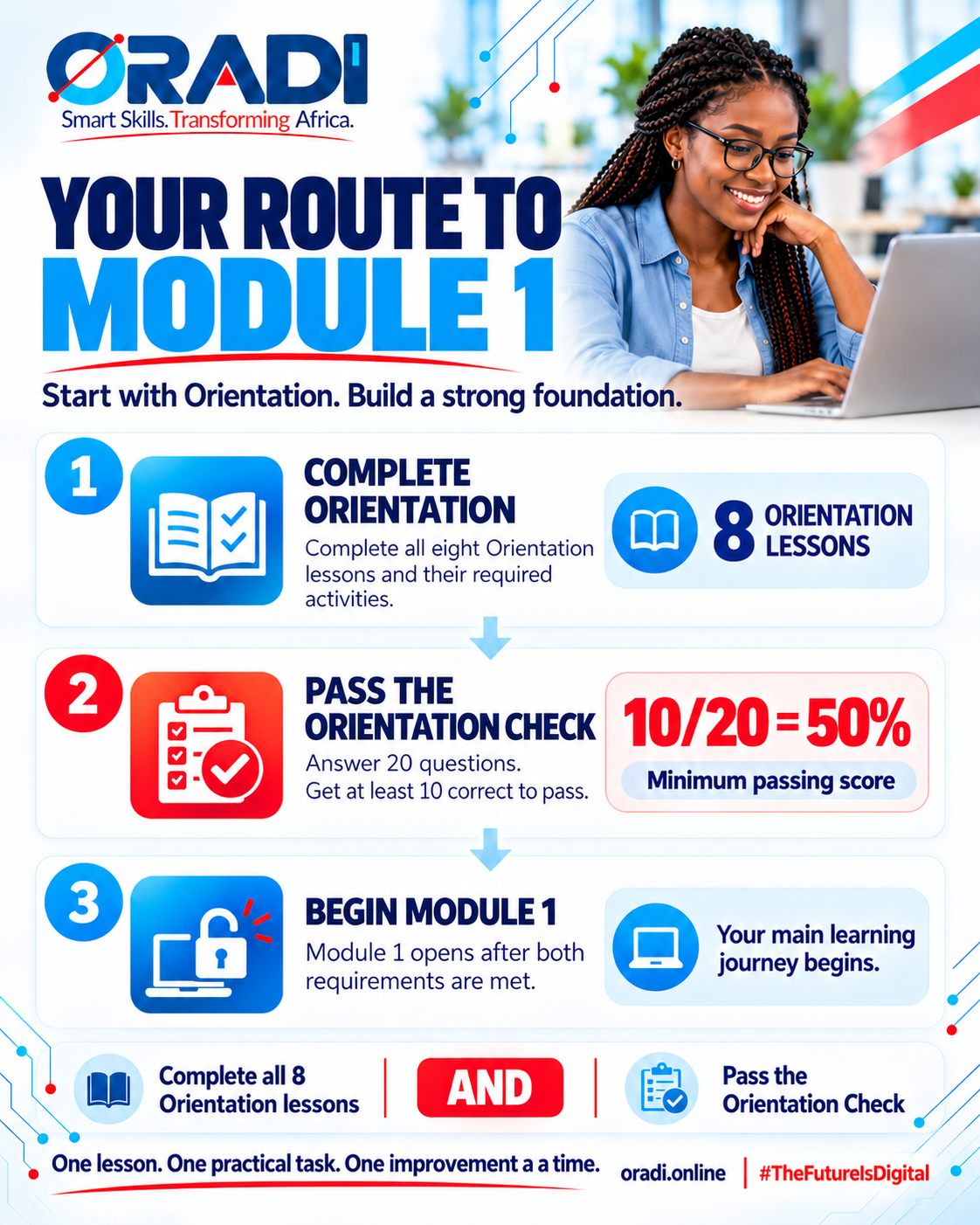
After completing the eight lessons, you will take the Orientation Check. It contains 20 questions, and you need at least 10 correct answers (50%) to pass. Passing the check unlocks Module 1.
You will learn the detailed assessment rules later in Orientation. For now, focus on understanding how to begin and what you want to achieve.
See It in the Workplace
Imagine that a supervisor asks you to prepare information for a meeting. You may need to:
- Find reliable information.
- Organise figures in a spreadsheet.
- Write a clear summary.
- Prepare a short presentation.
- Send the finished work professionally.
These are connected tasks. ORADI will help you develop a process for approaching them, doing the work and checking the result.
Your First Activity: Set Your ORADI Goal
Ungraded guided practice. Answer the three prompts in your learning notes, either in a notebook or a document. No upload is required.
- My reason for joining ORADI is …
- One task I want to do confidently by the end of the programme is …
- The first action I will take to support my learning is …
Choose a goal you can recognise in your own work.
“I want to create a clear spreadsheet that helps a small business track its sales.”
Keep your answers so you can revisit them as you progress.
Check Your Understanding
Use these questions as an ungraded self-check. If you write down your answers, keep them in your learning notes. No upload is required.
- What does applied mean in ORADI?
- How long is the programme?
- How many modules and lessons does it contain?
- What must you complete before Module 1 opens?
- What practical skill have you chosen as your personal goal?
If you are unsure about an answer, revisit What Is ORADI?, The Eight Areas You Will Study, How You Begin or Your First Activity: Set Your ORADI Goal before moving on.
Key Points to Remember
- ORADI develops practical digital, AI, office and workplace skills.
- The programme runs for 12 weeks and contains eight modules and 96 lessons.
- You will learn by practising, producing work, reviewing it and improving.
- You must complete all eight Orientation lessons and pass the 20-question Orientation Check with at least 10 correct answers (50%) before Module 1 opens.
- Your personal goal gives you a way to recognise your growth.
Complete and Continue
You are ready to complete this lesson when you have:
☐ Read the lesson.
☐ Watched Video 1.
☐ Studied the infographics.
☐ Answered all three prompts from Your First Activity: Set Your ORADI Goal in your learning notes.
☐ Checked that you understand the key points.
Mark Lesson 1 complete in your Student Portal, then continue to the next lesson.
Next: Orientation Lesson 2 — Using the ORADI Student Portal
One lesson, one practical task and one improvement at a time.
ORADI — Smart Skills. Transforming Africa.
655 Comments
Write a comment
-
-
Thank you so much ORADI for this opportunity ❤️
-
Thank you
-
Impressive
-
Interesting skill
-
Thankyou
-
amazing
-
Thank you very much I’m enjoying the lesson
-
Thank you so much
-
Thank you so much
-
Thank you so much
-
Thank you very much
-
Wow
-
Thank you so much I have enjoyed
-
wow, impressive
-
I want to have a skill that will help me handle digital operation and learn entrepreneurship
-
wow, this is very insightful
-
Thank you so much, this is wonderful
-
Thank you so much
-
This is wonderful
Become digitally ready, AI ready, career ready and future ready. Develop practical skills to pursue employment, grow in your role and strengthen your business. Smart Skills. Transforming Africa.
ABOUT ORADI
ORADI is an online learning platform helping people build the practical digital, AI and workplace skills to participate in Africa’s digital future. We prepare them to pursue employment, grow businesses and contribute to their communities.
Explore ORADI
Useful Links
Contact us
Follow us


Thank you for this opportunity I know that from these lessons I’m beginning to be computer literate